

A container pipeline is a software delivery workflow that automates building, testing, and deploying containerized applications through every stage of the development lifecycle. Container pipelines combine the isolation and portability of containerization with CI/CD automation, enabling DevOps teams to ship software faster and more reliably. This article covers how container pipelines work, their four key stages, and best practices for implementation in a DevOps environment.
(This article is part of our DevOps Guide. Use the right-hand menu to navigate.)
Why do organizations need container pipelines?
Containerization has revolutionized application development and deployment, producing isolated, dependency-managed, and immutable software applications that can be deployed anywhere. The reduced resource footprint of containers also helps minimize operational expenditure and management overhead.
Software teams need to deliver at speed to meet end-user demands and respond to shifting market conditions. That’s why organizations have moved toward automated software development lifecycles (SDLCs)—structured processes with enough agility to handle unexpected issues without slowing delivery.
The most important component of an effective SDLC is a delivery pipeline covering everything—development, testing, deployment, and maintenance—under a single overarching process. Container pipelines extend this concept by making the container the central unit of delivery.
What are the basics of an SDLC pipeline?
An SDLC pipeline is a workflow that creates an integrated, end-to-end process encompassing all stages of software development. At its most basic level, a pipeline consists of these stages:
- Development stage: Application code is developed and committed to a code repository
- Code review/acceptance stage: Code is reviewed manually or through automated checks
- Build stage: Code is built and packaged
- Testing stage: Comprehensive automated and manual testing is performed
- Deployment stage: Tested software is deployed to the production environment
Each stage includes built-in validations and verifications to catch errors early. When an error is detected, relevant teams are notified immediately so issues can be resolved before progressing. With most tasks automated, feedback loops are shorter—yet still robust enough to cover all aspects of the application.
SDLC pipelines are not limited to software development; they also apply to database management and infrastructure management.
How does a container pipeline differ from a traditional pipeline?
Container pipelines differ from traditional pipelines.
Container pipelines differ from traditional pipelines in one keyway: container pipelines focus on creating container images and deploying them in an orchestration platform like Kubernetes, rather than packaging and deploying traditional application artifacts. All standard SDLC stages remain in place, but the build and deployment stages are specifically designed around containers.
What are the four stages of a container pipeline?
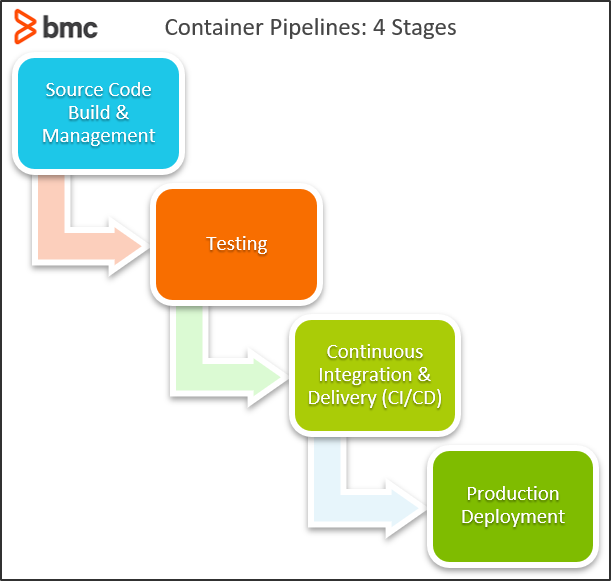
Container pipeline development focuses on four main areas: centralized source code management and build, testing, CI/CD, and production deployment. The complexity and scope of a container pipeline will depend on application architecture, requirements, deployment strategy, and the technologies in use. Because containers are the central component, the technology stack typically revolves around platforms common to containers: Docker, Kubernetes, and Rancher.
Stage 1: Centralized source code management and build
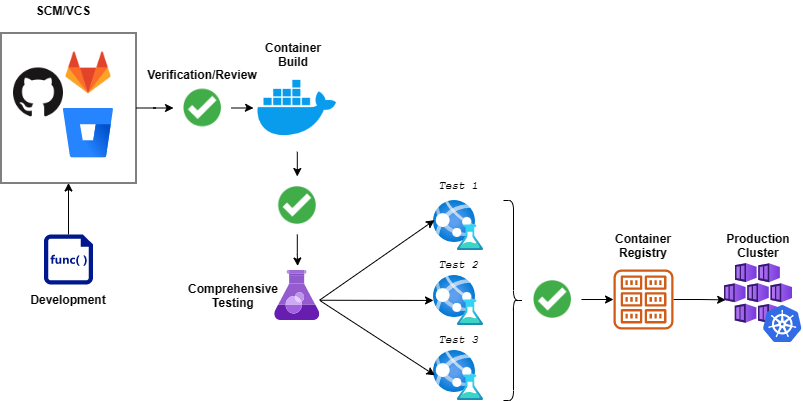
This stage is where all developers commit their code to a centralized code repository, spanning the development, code review, and build stages of the pipeline. A pull request acts as the starting point of the automated pipeline workflow in the code repository.
The first task is running a battery of tests to ensure the functionality of new code:
- Unit tests, which cover the core functionality of the code
- A/B tests, which compare the performance of two components
These tests ensure optimal, bug-free code. Since this is the first stage of the pipeline, detected issues can be fixed before they are transferred to the container. Next, the application is packaged and a container image is created—all dependencies are built at container creation time on top of a predetermined image. The image is then pushed to an internal container registry for deployment in a staging environment.
Stage 2. Testing
The testing stage begins once the container image is built and the pipeline has deployed the application in a staging environment. (These tests can also be rolled into continuous testing.) Testing covers functionality, performance, and security of the container. Key tests in this phase include:
- Functional tests, which verify that application behavior matches requirements
- Regression tests, which compare the new containerized application with previous versions
- Stress tests, which determine how the container behaves under less-than-optimal conditions
- Security testing, which scans for vulnerabilities through penetration testing and vulnerability scanning
After these tests pass, containers move to acceptance testing. The flexibility of containerization makes it easy to include end users in acceptance testing—simply deploy containers in a pre-production environment without modifying the application.
For containers that are part of a larger cluster or dependent on other containers, the testing phase must also include fault tolerance tests for cluster failures or communication issues. This ensures new container versions will not affect the underlying orchestration platform.
Stage 3: Continuous integration and delivery (CI/CD)
A robust CI/CD tool provides the automated platform that powers the container pipeline and combines all required pipeline functionality. Most CI/CD tools can accommodate container pipelines, including Jenkins, CircleCI, Travis CI, and TeamCity. Cloud-based options such as AWS CodeBuild or Azure DevOps also support container pipelines. Jenkins X and Flux are specialized tools with greater emphasis on container pipelines, using a GitOps approach with direct integrations for orchestration platforms like Kubernetes.
(Learn how to set up a CI/CD pipeline.)
When selecting a CI/CD tool, verify support for the technologies and services used in the pipeline: version control systems, build tools, and container platforms. The more native the support, the better the integration.
Primary requirements for a container pipeline CI/CD platform include native support for containerization:
- Creating containerized images
- Interacting with container registries
- Integrating with orchestration tools
Workarounds exist for some of these requirements, but they increase pipeline complexity and may require manual intervention. CI/CD tool selection should also account for expandability, which is especially important if the tool covers additional configurations such as database or infrastructure management. Finally, the pipeline should support multiple simultaneous workflows—essential when multiple teams are building different containers in a microservices-based application. (Compare containers and microservices.)
Stage 4. Production deployment
Production deployment is the logical end of a container pipeline. Once a container has been tested and accepted, it is deployed directly to the production environment from the pre-release environment—seamlessly and without modification.
Most containerized deployments rely on orchestration tools such as Kubernetes and Rancher. These tools simplify container deployments by offering native support for updating and recreating containers without affecting availability. Container images are pushed to a container registry, and the orchestration tool handles updating existing containers or provisioning new ones. Because orchestration tools are platform-agnostic, teams can deploy to any supported cluster and run multi-cloud deployments from a single pipeline.
What are the best practices for container pipelines?
Container pipeline best practices center on properly configuring each of the four stages and establishing clear workflows for every phase. Teams can extend container pipelines further by integrating infrastructure management to handle staging and production infrastructure directly within the pipeline.
For example, provisioning a new server or updating load balancer configurations and network routing can be handled from the pipeline through IaC tools such as Terraform or AWS CloudFormation. When taking this approach, it is essential to properly manage external resources—firewalls, data stores, and backups—even in cloud-based managed Kubernetes clusters. Incorporating infrastructure management into the container pipeline creates a single, comprehensive process that covers all aspects of deployment.
Increase development speed and flexibility
Container pipelines are software delivery pipelines geared toward building and deploying containers. Combining containerization with automated CI/CD tools gives software delivery teams greater flexibility while accelerating the development process.
FAQ: container pipelines in DevOps
What is a container pipeline in DevOps?
A container pipeline in DevOps is an automated software delivery workflow that builds, tests, and deploys containerized applications through every stage of the SDLC. Container pipelines use CI/CD tools to automate the process from source code commit through to production deployment, with the container as the central unit of delivery.
What are the four stages of a container pipeline?
The four stages of a container pipeline are: (1) centralized source code management and build, where code is committed and container images are created; (2) testing, covering functional, regression, stress, and security tests; (3) CI/CD, where automated tools orchestrate and connect every pipeline stage; and (4) production deployment, where the tested and accepted container is released to the production environment.
How does a container pipeline differ from a traditional delivery pipeline?
A traditional delivery pipeline focuses on building and deploying standard application packages, while a container pipeline is designed specifically to build container images and deploy them through an orchestration platform like Kubernetes. The core SDLC stages are the same in both, but the build and deployment stages in a container pipeline are built around container technologies and registries.
Which CI/CD tools support container pipelines?
Popular CI/CD tools that support container pipelines include Jenkins, CircleCI, Travis CI, TeamCity, AWS CodeBuild, and Azure DevOps. Jenkins X and Flux are purpose-built options with native container pipeline support and direct Kubernetes integration using a GitOps approach.
What role does Kubernetes play in a container pipeline?
Kubernetes serves as the orchestration platform for production deployment in a container pipeline. Kubernetes manages the deployment, scaling, and updating of containers without affecting application availability. Because Kubernetes is platform-agnostic, it enables teams to deploy to any supported cluster and run multi-cloud deployments from a single pipeline.
Related reading
- BMC DevOps Blog
- Container Sprawl: What It Is & How To Avoid It
- Managing Containers & Code for DevOps
- How To Run MongoDB as a Docker Container
- Automation In DevOps: Why & How To Automate DevOps Practices
- How & Why To Become a Software Factory
The views and opinions expressed in this post are those of the author and do not necessarily reflect the official position of BMC.
These postings are my own and do not necessarily represent BMC's position, strategies, or opinion.
See an error or have a suggestion? Please let us know by emailing blogs@bmc.com.