


Logstash is a free, open-source server-side data processing pipeline that ingests data from multiple sources, transforms it through configurable filters, and routes it to downstream storage or analytics platforms. As the ingest engine of the ELK stack, Logstash is one of the most widely adopted tools for building robust Logstash data pipeline workflows at scale. This guide covers how Logstash works, how to configure it, and the top alternatives worth evaluating.
Data is a core part of any modern application—the catalyst for use cases ranging from infrastructure and application troubleshooting to analyzing user behavior patterns and building complex machine learning models. Collecting that data reliably from many sources is exactly what Logstash is built to do.
The ELK stack is one of the leading solutions for analyzing application and server data. It combines three open-source products:
- Elasticsearch
- Logstash
- Kibana
Elasticsearch, built on the Lucene engine, is the storage and analytical backbone of the ELK stack. Kibana lets you visualize the data on Elasticsearch in any shape or form. Logstash is the ingest engine—the starting point of the stack—aggregating data from multiple services, files, and logs and pushing it to Elasticsearch for further analysis.
(This article is part of our ElasticSearch Guide. Use the right-hand menu to navigate.)
What is Logstash?
Logstash is a free and open-source, server-side data processing pipeline that can be used to ingest data from multiple sources, transform it, and send it to further processing or storage.
While Logstash is an integral part of the ELK stack, Logstash is not limited to that ecosystem. Logstash can push data not only to Elasticsearch but also to services like Zabbix, Datadog, InfluxDB, MongoDB, and message brokers like RabbitMQ and Amazon SQS.
Logstash consists of three core sections—inputs, filters, and outputs—as shown in the diagram below.
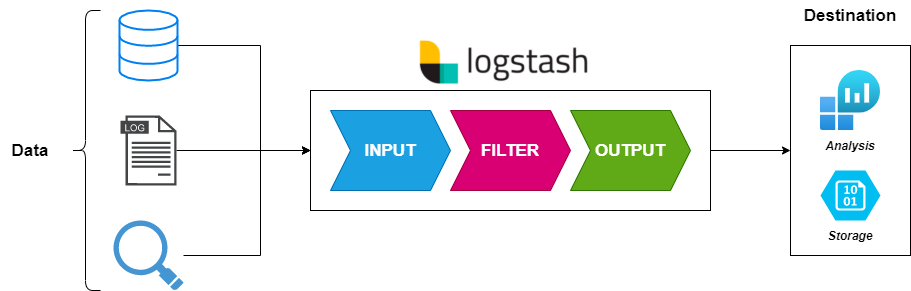
How does a Logstash data pipeline collect data?
Logstash’s primary feature is its ability to collect and aggregate data from multiple sources. With over 50 plugins available, Logstash can gather data from a wide variety of platforms and services—from common inputs like file, beat, Syslog, stdin, UDP, TCP, HTTP, and heartbeat to specific services such as Azure Event Hub, Apache Kafka, AWS Kinesis, Salesforce, and SQLite.
Inputs are the starting point of any Logstash configuration. By default, Logstash automatically creates a stdin input if no inputs are defined. Properly configuring, categorizing, and tagging inputs is critical: without accurate tagging, data cannot be correctly processed by filters or routed to the intended output destination.
How does Logstash transform and filter data?
What distinguishes Logstash from most other data shippers is its ability to apply filters to incoming data. Rather than acting as a simple aggregator, Logstash extracts information from raw data and transforms it into structured, meaningful formats as an intermediary step before sending it downstream.
This transformation reduces the processing workload for services like Elasticsearch and provides a consistent format that improves downstream analysis. Logstash offers a broad range of filter plugins—from a simple CSV plugin for tabular data to grok, which parses unstructured data into named fields, to urldecode and many others.
Where does Logstash output data?
After data has been collected and filtered, Logstash can route it to a wide range of destinations. Logstash outputs include Elasticsearch, flat files, storage services like Amazon S3, messaging services like SQS and Kafka, and analytics platforms like AWS CloudWatch and Google BigQuery.
Logstash is not limited to a single output. By default, Logstash creates a stdout output when none is configured, but Logstash can be set up to push data to multiple destinations simultaneously while routing specific inputs to specific outputs.
How do you configure and install Logstash?
Logstash requires Java (JVM) to run. Most architecture-specific installation bundles include the necessary Java version while allowing users to swap it as needed.
Installing Logstash
Logstash supports installation on all major operating systems—Windows, Linux, and macOS—as well as Docker images and Helm Charts for Kubernetes deployments.
The example below shows how to get started with a Docker-based Logstash installation. Creating the Logstash container is a relatively straightforward process:
# Pull Image
docker pull docker.elastic.co/logstash/logstash:<version>
# Create Container - Config Folder
docker run --rm -it -v ~/config/:/usr/share/logstash/config/ docker.elastic.co/logstash/logstash:<version>
# Create Container - File Attached
docker run --rm -it -v ~/config/logstash.yml:/usr/share/logstash/config/logstash.yml docker.elastic.co/logstash/logstash:<version>
Logstash configuration structure
A Logstash configuration file consists of input, filter, and output sections. A single Logstash instance can run multiple configuration files, collecting from multiple services and routing to different destinations. Configuration files are typically stored in /etc/logstash/conf.d/ with a .conf extension.
The example below shows a simple configuration that reads from a file and outputs to another file without any filtering:
read-log.conf
input {
file{
path => "/tmp/*.logs"
start_position => "beginning"
codec => json
}
}
output {
file {
path => "home/user/logstash_out.log"
}
}
For a more comprehensive example, the configuration below pushes Nginx logs to Elasticsearch:
nginx-logs.conf
input {
file {
type => "nginx"
path => "/var/log/nginx/*"
exclude => "*.gz"
}
}
filter {
if [type] == "nginx" {
grok {
patterns_dir => "/etc/logstash/patterns"
match => { "message" => "%{NGINX_ACCESS}" }
remove_tag => ["_grokparsefailure"]
add_tag => ["nginx_access"]
}
geoip {
source => "clientip"
}
}
}
output {
elasticsearch {
hosts => ["www.test.host:9200"]
}
}
What are the best Logstash alternatives?
Logstash is powerful and versatile, but its feature depth comes with a higher learning curve and greater resource requirements than some alternatives. The options below serve as Logstash alternatives depending on the complexity and scale of your data ingestion needs.
Filebeat
Filebeat is a lightweight log shipper from the creators of the Elastic stack. Filebeat specializes in collecting data from specified files or logs, making it significantly less resource-intensive than Logstash. Filebeat is an excellent choice for simple data ingestion and can even serve as an input source for Logstash in combined deployments. The trade-off is functionality: Filebeat’s outputs are limited to Logstash, Elasticsearch, Kafka, and Redis.
Logagent
Logagent from Sematext is an open-source, cloud-native log shipper that competes directly with Logstash. Logagent supports filtering, multiple input types (Syslog, file, Azure events, webhook, MySQL, and MSSQL queries), and output to Elasticsearch, Amazon Elasticsearch, and Prometheus. Logagent also has a gentler learning curve than Logstash. That said, Logstash remains the more mature platform with broader input, filter, and output support overall.
Fluentd
Fluentd is an open-source data collector designed to provide a unified logging layer. Fluentd’s key differentiator is its approach to structuring data as JSON wherever possible, which simplifies processing for downstream services. Now a CNCF project, Fluentd integrates with over 500 platforms and services. Fluentd is an excellent choice for structured data scenarios but requires workarounds—such as regex-based filtering and tagging—when handling unstructured data, and presents a steeper learning curve for beginners.
rsyslog
rsyslog (Rocket-fast System for Log Processing) is optimized for high-performance log processing. rsyslog leverages full multi-threading to use modern hardware efficiently and delivers consistent performance regardless of how many parsing rules are in play. rsyslog supports a wide range of input and output options with granular Syslog message filtering. The primary drawback is configuration complexity: rsyslog has the steepest setup process of the alternatives listed here, but delivers a stable experience once configured.
Logstash: user-friendly and feature-rich
Logstash is one of the most capable data collection and processing tools available. As a core part of the ELK stack, Logstash has earned broad industry adoption for collecting, aggregating, filtering, and routing data into robust processing pipelines. For teams that need to ingest data from diverse inputs, transform it in flight, and send it to multiple destinations, Logstash remains one of the strongest options on the market. It is one of the best options for ingesting data from various inputs before sending it to storage or further analytics.
Frequently asked questions
What is Logstash used for?
Logstash is an open-source data processing pipeline used to collect data from multiple sources, transform it using configurable filters, and route it to output destinations such as Elasticsearch, databases, message brokers, and cloud storage services. Logstash is most commonly used as the ingest layer of the ELK stack.
What is the difference between Logstash and Filebeat?
Filebeat is a lightweight log shipper designed for simple collection and forwarding with minimal resource usage. Logstash is a full data processing pipeline that supports complex filtering, transformation, and multi-destination output. Filebeat is often used as a Logstash input source in combined ELK deployments where lightweight collection and powerful processing are both needed.
Does Logstash require Elasticsearch?
No. While Logstash is part of the ELK stack, Logstash can output data to many destinations beyond Elasticsearch—including Kafka, RabbitMQ, Amazon SQS, MongoDB, InfluxDB, Datadog, Google BigQuery, and flat files. Logstash works independently of any specific output platform.
What is a grok filter in Logstash?
Grok is a Logstash filter plugin that parses unstructured log data into structured, named fields using pattern matching. Grok is one of the most widely used Logstash filters for processing raw log lines from web servers, applications, and system logs before indexing them in Elasticsearch or another output.
What are the system requirements for running Logstash?
Logstash requires Java (JVM) to run. Most Logstash installation bundles include the required Java version for the target architecture. Logstash is more resource-intensive than lighter alternatives like Filebeat, so production deployments typically benefit from dedicated CPU and memory allocation, particularly when running complex filter pipelines.
Related reading
- BMC Machine Learning & Big Data Blog
- BMC DevOps Blog
- Data Architecture Explained: Components, Standards & Changing Architectures
- How to Set Up an Elastic Version 7 Cluster
- Data Annotation & Its Role in Machine Learning
- How To Monitor NGINX Using Kibana and Elasticsearch on Docker
The views and opinions expressed in this post are those of the author and do not necessarily reflect the official position of BMC.
These postings are my own and do not necessarily represent BMC's position, strategies, or opinion.
See an error or have a suggestion? Please let us know by emailing blogs@bmc.com.