


An Apache Spark machine learning pipeline is an object that chains transform, evaluate, and fit operations into a single executable workflow using org.apache.spark.ml.Pipeline. Instead of running each data transformation step separately on a dataframe, you define all stages once and let the Pipeline object execute them in sequence—making ML code cleaner, more reproducible, and easier to move into production.
This tutorial demonstrates the Apache Spark machine learning pipeline concept by converting existing staged Spark ML code into pipeline format. The existing code is explained in two blog posts: part one and part two. Reading those first is recommended, as you will need them to generate the data used here. (Alternatively, use maintenance_data.csv as both the test and training data to skip ahead.)
The Spark Pipeline object is org.apache.spark.ml.{Pipeline, PipelineModel}.
(This tutorial is part of our Apache Spark Guide. Use the right-hand menu to navigate.)
What is an Apache Spark machine learning pipeline?
In general, a machine learning pipeline describes the end-to-end process of writing code, releasing it to production, extracting data, creating training models, and tuning the algorithm. In Apache Spark specifically, a pipeline is an object that puts transform, evaluate, and fit steps into one object: org.apache.spark.ml.Pipeline. These steps together are called a workflow.
The Apache Spark documentation illustrates this with a graphic: starting from a raw dataframe, any transformation steps—along with the ML algorithm itself—are fed into the Pipeline object, which executes them in the specified sequence.
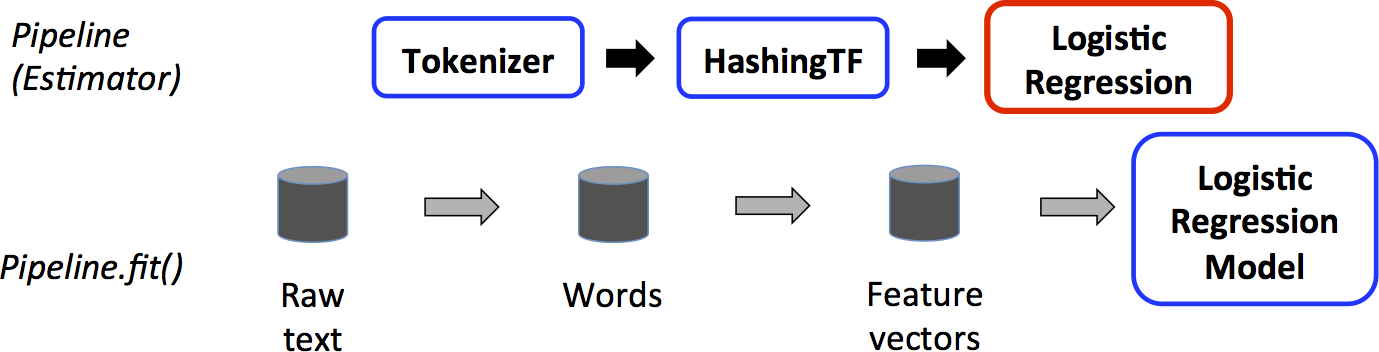
How does the Spark Pipeline object work?
The Apache Spark Pipeline object executes three types of operations on a dataframe:
- Transform—modifies a dataframe, such as adding feature or label columns
- Fit—feeds the dataframe into the ML algorithm and calculates the result, creating the trained model
- Evaluate—assesses model performance
In the graphic above, the dataframe is created by reading data from Hadoop or another source. The transform() and fit() operations are then performed on it to add feature and label columns—the format required by the logistic regression ML algorithm. Each of these discrete steps is fed into the pipeline object.
The Spark documentation example illustrates this clearly:
val tokenizer = new Tokenizer()
.setInputCol("text")
.setOutputCol("words")
val hashingTF = new HashingTF()
.setNumFeatures(1000)
.setInputCol(tokenizer.getOutputCol)
.setOutputCol("features")
val lr = new LogisticRegression()
.setMaxIter(10)
.setRegParam(0.001)
val pipeline = new Pipeline()
.setStages(Array(tokenizer, hashingTF, lr))
Each of these three steps is handled by the pipeline object via val pipeline = new Pipeline().setStages(Array(tokenizer, hashingTF, lr)).
How do you convert staged Spark ML code to a pipeline?
To illustrate with a working example, the code below rewrites the programs from the blog posts above—originally two separate programs (create model / make predictions)—into one combined program.
Note: The code examples below were written for Spark 1.x/2.x. Some APIs (such as com.databricks.spark.csv and SQLContext) have been superseded in later Spark versions, but the pipeline concepts and structure remain valid across versions.
First, include the required imports:
import org.apache.spark.sql.SQLContext
import org.apache.spark.SparkConf
import org.apache.spark.SparkContext
import com.databricks.spark.csv
import org.apache.spark.ml.classification.LogisticRegression
import org.apache.spark.mllib.linalg.{Vector, Vectors}
import org.apache.spark.ml.evaluation.BinaryClassificationEvaluator
import org.apache.spark.ml.feature.{VectorAssembler, StringIndexer}
import org.apache.spark.ml.classification.LogisticRegressionModel
import org.apache.spark.ml.{Pipeline, PipelineModel}
import org.apache.spark.sql.Row
Old approach: staged operations
val df2 = assembler.transform(df)
val df3 = labelIndexer.fit(df2).transform(df2)
val model = new LogisticRegression().fit(df3)
New approach: Pipeline.setStages()
Instead of running transform() operations separately, feed VectorAssembler(), StringIndexer(), and LogisticRegression() into new Pipeline().setStages(Array(assembler, labelIndexer, lr)). Then run pipeline.fit() on the original dataframe. The pipeline executes each transformation in the order defined by .setStages().
var file = "hdfs://localhost:9000/maintenance/maintenance_data.csv";
val sqlContext = new SQLContext(sc)
val df = sqlContext.read.format("com.databricks.spark.csv").option("header", "true").option("inferSchema", "true").option("delimiter",";").load(file)
val featureCols =  Array("lifetime", "pressureInd", "moistureInd", "temperatureInd")
val assembler = new VectorAssembler().setInputCols(featureCols).setOutputCol("features")
val labelIndexer = new StringIndexer().setInputCol("broken").setOutputCol("label")
val lr = new LogisticRegression()
val pipeline = new Pipeline().setStages(Array(assembler, labelIndexer, lr))
val model = pipeline.fit(df)
How do you make predictions with a fitted Spark PipelineModel?
Once the Apache Spark pipeline is fitted, making predictions is straightforward. The fitted PipelineModel already stores all transformations. Read in the test data (created in blog post part one) and run transform() on it. Then filter for machines where the logistic regression prediction value is greater than 0 (i.e., equals 1) to identify those that require maintenance.
var predictFile = "hdfs://localhost:9000/maintenance/2018.05.30.09.46.55.csv"
val testdf = sqlContext.read.format("com.databricks.spark.csv").option("header", "true").option("inferSchema", "true").option("delimiter",";").load(file)
val predictions =  model.transform(testdf)
predictions.select("team", "provider", "prediction").filter($"prediction" > 0).collect().foreach { case Row(team: String,provider: String, prediction: Double) =>
println(s"($team, $provider, $prediction) --> team=$team, provider=$provider, prediction=$prediction")
}
The results look like this:
(TeamA, Provider4, 1.0) --> team=TeamA, provider=Provider4, prediction=1.0
(TeamC, Provider2, 1.0) --> team=TeamC, provider=Provider2, prediction=1.0
(TeamC, Provider4, 1.0) --> team=TeamC, provider=Provider4, prediction=1.0
(TeamB, Provider1, 1.0) --> team=TeamB, provider=Provider1, prediction=1.0
(TeamC, Provider2, 1.0) --> team=TeamC, provider=Provider2, prediction=1.0
(TeamB, Provider2, 1.0) --> team=TeamB, provider=Provider2, prediction=1.0
(TeamA, Provider2, 1.0) --> team=TeamA, provider=Provider2, prediction=1.0
Frequently asked questions about Apache Spark machine learning pipelines
What is the difference between a Spark ML pipeline and running staged operations manually?
A staged approach requires manually passing dataframes between each transform and fit step, increasing the risk of ordering errors and making the code harder to maintain. An Apache Spark ML pipeline encapsulates all steps—including feature engineering and model fitting—into a single Pipeline object that executes them automatically in the sequence defined by .setStages().
What is the difference between transform() and fit() in an Apache Spark pipeline?
In an Apache Spark ML pipeline, transform() modifies a dataframe by adding columns such as feature vectors or labels. fit() feeds the dataframe into the ML algorithm and returns a trained model. Both can be defined as stages in the Pipeline object and executed together via pipeline.fit().
What does Pipeline.setStages() do in Apache Spark?
Pipeline.setStages() defines the ordered sequence of transformers and estimators the pipeline will execute. The Pipeline object runs each stage in the array in the specified order, passing the output dataframe of each stage as the input to the next.
Can a fitted Spark PipelineModel be reused for predictions on new data?
Yes. Once trained via pipeline.fit(), the resulting PipelineModel stores all fitted transformers and the trained estimator. Calling model.transform(testdf) on any new dataframe applies all pipeline stages automatically—there is no need to redefine or rerun the transformation steps.
What imports are required to use the Spark Pipeline object in Scala?
At minimum, using the Apache Spark Pipeline object requires import org.apache.spark.ml.{Pipeline, PipelineModel}. Depending on the transformers and estimators in use, additional imports such as VectorAssembler, StringIndexer, and LogisticRegression from the org.apache.spark.ml package will also be needed.
The views and opinions expressed in this post are those of the author and do not necessarily reflect the official position of BMC.
These postings are my own and do not necessarily represent BMC's position, strategies, or opinion.
See an error or have a suggestion? Please let us know by emailing blogs@bmc.com.