




TL;DR Summary: Using Apache Hive with ElasticSearch enhances data analysis by allowing SQL queries on web server logs. The guide details installation, configuration, and data loading processes.
- Hive enables SQL queries and user-defined functions for improved data management.
- ElasticSearch is essential for log storage and querying, key for cybersecurity and operations monitoring.
Here we explain how to use Apache Hive with ElasticSearch. We will copy an Apache webserver log into ElasticSearch then use Hive SQL to query it.
Why do this? Hive lets you write user defined functions and use SQL (actually HQL) which is easier to work with and provides more functions that ElasticSearch, whose query language is Lucene Query. For example you can join sets of data with Hive. And you can run advanced analytics against Hive using Spark ML (machine learning) or other tool.
As we pointed out before, some tutorials are written to show how to store Hive data in ElasticSearch. But that is not logical as the whole goal of ES is to gather logs from webservers, firewalls, etc. and put them in one place (ES) where they can be queried. This is for cybersecurity and operations monitoring.
ElasticSearch provides the elasticsearch-hadoop connector to let you read (and write) ES documents. What happens when you do that is creates data in Hive tables from ES. Hive does not store the data in ES.
Install Hive
First, install Hive using these directions. After this MySQL will be running. If it is not you will get error Unable to instantiate org.apache.hadoop.hive.ql.metadata.SessionHiveMetaStoreClient.
And install Hadoop.
Then download the Hive-Hadoop connector download a Hive-Hadoop connector and copy it to $HIVE_HOME/lib
cp /home/walker/Documents/jars/elasticsearch-hadoop-5.5.2.jar $HIVE_HOME/lib
Start Hadoop using start-dfs.sh. It is only necessary to start Yarn too if you are running on a cluster.
Start Hive
Start hive using:
hive
Or you can run it in debug mode to see and then fix errors with your installation. For example if you forget to copy the connector jar to the lib folder it will throw a class not found error.
hive --hiveconf hive.root.logger=DEBUG,console
You can also see stdout here /tmp/(your userid)/hive.log
Install ElasticSearch and Load Some Data
Explaining how to install ES is beyond the scope of this data. You can follow their instructions here.
Download Sample Data and Upload
We need some data to analyze. You can download a sample Apache log from here.
You will need to install unrar to unzip it:
unrar x apache-access_log.rar
Then copy this Apache logstash config from here and name it apache.conf. Put it in the root folder of the logstash installation.
    input {
file {
path => "/tmp/access_log"
start_position => "beginning"
}
}< filter {
if [path] =~ "access" {
mutate { replace => { "type" => "apache_access" } }
grok {
match => { "message" => "%{COMBINEDAPACHELOG}" }
}
}
date {
match => [ "timestamp" , "dd/MMM/yyyy:HH:mm:ss Z" ]
}
}
output {
elasticsearch {
hosts => ["localhost:9200"]
}
stdout { codec => rubydebug }
}
Then start logstash with that config file.
bin/logstash -f apache.conf
Then copy the data to the /tmp/access_log file path indicated in the apache.conf file.
cp access_log /tmp/
The screen will start to echo the output like this as logstash goes to work:
    {
"path" => "/tmp/access_log",
"@timestamp" => 2017-09-21T12:16:33.346Z,
"@version" => "1",
"host" => "eurovps",
"message" => "d97082.upc-d.chello.nl - - [12/Mar/2004:13:25:45 -0800] \"GET /SpamAssassin.html HTTP/1.1\" 200 7368\r",
"type" => "apache_access",
"tags" => [
[0] "_grokparsefailure"
]
}
Now if you query ES from the command line you should see the new index and document count:
    curl http://localhost:9200/_cat/indices?v
health status index      uuid      pri rep docs.count docs.deleted store.size pri.store.size
yellow open logstash-2017.09.21 DBRrjIlvQtG67ddb7qUnxw 5 1 1550
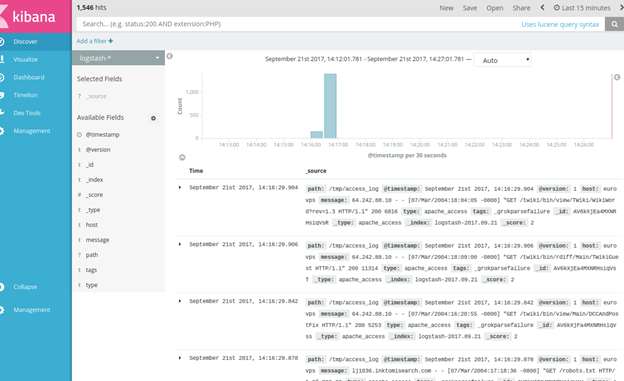
Then open Kibana and see the data there as well.
Now tell Hive to read this data by creating a table like this:
    CREATE EXTERNAL TABLE apachelog (
path string,
timex timestamp,
Version int,
Host string,
Message string,
Index string
)
STORED BY 'org.elasticsearch.hadoop.hive.EsStorageHandler'
TBLPROPERTIES( 'es.nodes.wan.only' = 'true', 'es.resource' = 'logstash-2017.09.21', 'es.query' = '?q=*');
es.resource is the ES index.
Es.nodes.wan.only will solve network connectivity problems (i.e., if Hive complains about that.)
Host will default to localhost.
ES will create this:
    describe apachelog;
OK
path          string          from deserializer
timex         timestamp       from deserializer
version       int             from deserializer
host          string          from deserializer
message       string          from deserializer
index         string          from deserializer
Now, we did not set up grok correctly or it would have parsed the message field in Apache. But we cal pull out the IP address ourselves like this:
select regexp_extract(message, '^([0-9]{1,3}\\.){3}[0-9]{1,3}',0) as ip from apachelog;
Now we can run a query to show which IP addresses have access the web server the most number of times. We do this in two steps:
- Create intermediate table iptab.
- Query table iptab.
Here is the count:
create table iptab as select regexp_extract(message, '^([0-9]{1,3}\\.){3}[0-9]{1,3}',0) as ip from apachelog;
Here is the count:
    select count(ip) as c, ip from iptab group by ip order by c desc;
452        64.242.88.10
270         10.0.0.153
20                    207.195.59.160
14                    128.227.88.79
14                   212.92.37.62
13                    203.147.138.233
12                    195.246.13.119
7          145.253.208.9
7          142.27.64.35
4          194.151.73.43
4          61.165.64.6
4          80.58.14.235
4          208.247.148.12
3          67.131.107.5
3          61.9.4.61
3          80.58.33.42
2          200.160.249.68
1          80.58.35.111
1          66.213.206.2
1          64.246.94.152
1          64.246.94.141
1          4.37.97.186
1          219.95.17.51
1          216.139.185.45
1          213.181.81.4
1          200.222.33.33
1          195.230.181.122
1          195.11.231.210
1          12.22.207.235
1          212.21.228.26
ElasticSearch Guide
- ElasticSearch Tutorial for Beginners: ElasticSearch Basics
- Using Apache Hive with ElasticSearch
- Using ElasticSearch with Apache Spark
- Curl ElasticSearch Commands Cheat Sheet
- Spark ElasticSearch Hadoop Update and Upsert Example and Explanation
- How To Write Apache Spark Data to ElasticSearch Using Python
- ElasticSearch Search Syntax and Boolean and Aggregation Searches
- ElasticSearch Nested Queries: How to Search for Embedded Documents
- ElasticSearch Joins: Has_Child, Has_parent query
- How to Setup up an Elastic Version 7 Cluster
- How to Configure Filebeat for nginx and ElasticSearch
- Using Beats and Logstash to Send Logs to ElasticSearch
- How to Load CSV File into ElasticSearch with Logstash
- ElasticSearch Aggregations Explained
- What is the ELK Stack?
- Logstash 101: Using Logstash in a Data Processing Pipeline
- Using Kibana to Execute Queries in ElasticSearch using Lucene and Kibana Query Language
- ElasticSearch Machine Learning
- How to Install Elastic Enterprise Search
- How To Use Elastic Enterprise Search with GitHub
These postings are my own and do not necessarily represent BMC's position, strategies, or opinion.