



TL;DR Summary: Automation in DevOps enhances efficiency by streamlining processes, minimizing manual tasks, and boosting productivity while reducing human errors. It applies to various stages of the software development lifecycle.
- Key benefits include consistency, scalability, speed, and flexibility.
- DevOps automation encompasses design, deployment, and monitoring phases.
With the rapid growth of technology sector software, development teams are under constant pressure to meet the increased customer expectations for business applications. These expectations usually involve:
- Improving performance
- Extending functionality
- Providing guaranteed availability and uptime
The traditional software development process has changed with the advent of cloud-based applications. The current paradigm is to consider developing the software as an ongoing service, rather than simply creating software for a specific requirement provided by a customer. Software development has changed from a monolithic structure to an agile structure, where developers consistently improve the software to meet the evolving customer requirements.
Software development companies have responded to this new approach by embracing modern Software Development Lifecycle (SDLC) methodologies such as Agile, Scrum, and Kanban, to deliver product features, improvement, and bug fixes.
DevOps and automation are two key components that help organizations streamline the development process. This results in two significant changes:
- Increasing cross-department/inter-team collaboration
- Automating manual and repetitive tasks in the development process
The combination of DevOps with automation leads to a more efficient SDLC.
What is DevOps automation?
DevOps automation is the practice of automating repetitive and manual DevOps tasks to be carried out without any human interaction. Automation can be applied throughout the DevOps lifecycle, spanning:
- Design and development
- Software deployment and release
- Monitoring
The goal of DevOps automation is to streamline the DevOps lifecycle by reducing manual workload. This automation results in several key improvements:
- Eliminates the need for large teams
- Drastically reduces human errors
- Increases team productivity
- Creates a fast-moving DevOps lifecycle
Automation relies primarily on software tools and presetting configurations to automate necessary processes and tasks.
Automation in DevOps enables standardization
We already know how a monolithic SDLC approach will be unable to provide the flexibility and responsiveness you need to tackle the requirements of:
- Varying customer needs
- Evolving technological landscape
- Market trends
- Compliance requirements
- Internal business goals
Certainly, each constraint comes with its own technical and business dependencies.
To address these challenges, DevOps teams must adopt standardized workflows, processes, technologies, protocols, and metrics. All these tools support an environment that:
- Minimizes duplications
- Provides proper guidelines
- Reduces risks
Using standardized practices also enhances the potential for automating other manual processes—moving from automation to orchestration. So, we can say that:
Standardization is a key component of successfully and accurately capturing the automation scope and implementing a proper automation strategy for DevOps.
Adaptability vs standardization
While standardization is preferable in many cases, it should not stand in the way of adaptability, especially when it comes to tooling.
DevOps is consistently evolving, and every organization will have different workflows, strategies, and implementations. Standardizing tools without any adaptability will cause conflicts with evolving technologies and practices in the industry.
The concept of automation in DevOps—encompassing standardization—also applies to the governance models. Any standardization should be flexible enough to easily adapt to:
- New requirements
- Technological improvements
This can be done by providing a mechanism to facilitate the adoption of new technologies that streamline the technologies utilized in the DevOps process.
For instance, a standardized library of tools requested by any team member for development, testing, deployment, or monitoring purposes must be created and vetted by the organization. When a new tool is required in the DevOps pipeline, a proper workflow should be in place to quickly vet the tool or technology and add it to the standard library.
Automation is not just about automating tasks and processes. In the wider DevOps landscape, automation helps to:
- Eliminate performance bottlenecks
- Minimize communication gaps between the development, operations, and quality assurance teams
- Introduce mechanisms that facilitate agility through standardized processes
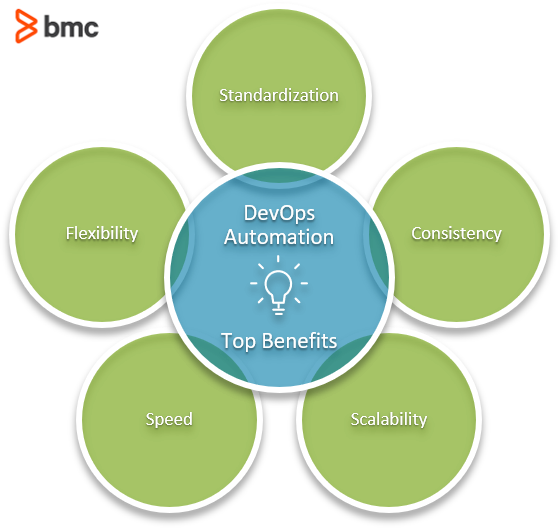
More benefits of automated DevOps
The benefits of automation are not limited to performance improvements. Here’s a look at additional benefits:
Automation is very helpful in identifying errors and behavioral issues in software applications.
In any highly automated process or task, the end result is always consistent and predictable. Thanks to its underlying static software configuration and the lack of human interaction, you’ve essentially eliminated user errors.
Automated processes are much easier to scale than manual processes. Scale automation processes simply by creating additional processes to meet the increased requirements.
In a manual environment, any scaling is severely constrained by the availability of team members.
However, in an automated environment, scaling is only constrained by the availability of underlying software and hardware, which is not an issue in cloud-based environments where resources are automatically scaled depending on the workload. A great example of this is Automatic Scale In/Out and Up/Down functions.
One of the most important factors in DevOps is that the ability to go through the lifecycle stages quickly has a significant effect on the deliverability of the project.
An automated process will be executed regardless of the time or availability of team members to manually trigger the task, allowing us to go through each process without any delays. Additionally, it's almost always faster when a process is automated with a standard template compared to running it manually.
Automation allows us to be flexible in terms of both the scope and functionality of the automated process.
Most of the time, the only constraint of the functionality and scope is the configuration of the automation process, which can be changed easily to meet the requirements. It is more flexible than training a team member to adapt to the changes in the process.
What DevOps processes should be automated?
The simple answer: almost everything that can be automated.
However, in practice, which processes to automation depends on external factors such as:
- Organizational needs
- Technological feasibility
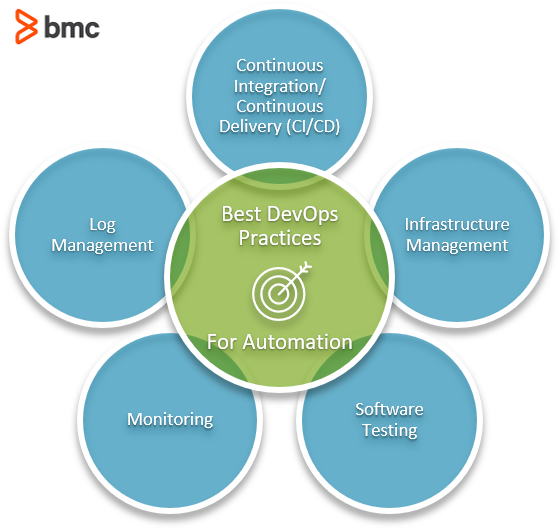
A good DevOps team will be able to choose the processes that should be automated in their DevOps lifecycle. Here are some common processes that are ideal for automation.
Continuous integration/continuous delivery (CI/CD)
According to the core concepts and tools governing agile software development, CI/CD is the main component that needs to be automated in any organization. Automation can cover all aspects of this:
- Code commits
- Builds
- Deploying packaged applications in relevant testing/production environments
(See the many benefits of deployment automation.)
Infrastructure management
Managing infrastructure such as networks and servers requires a considerable investment of time from the initial setup, configuration, and maintenance.
Automate infrastructure management by creating software-defined-infrastructure which will manage infrastructure with minimal or no human interactions.
This is the best place to apply automation across the board. Utilizing test automation tools like Selenium and Puppeteer is easier than ever to automate tests of any kind. This can include:
- Simple unit tests
- UI tests
- Smokes tests
- User interaction tests
(Learn more about testing automation.)
Rapid changes mean it is nearly impossible to keep track of components and changes. Automation helps by enabling the DevOps team to create automated monitoring rules and generate alerts to keep track of:
- Infrastructure availability
- Performance
- Security issues
- Etc.
Logs are paramount in identifying issues in an application. An application might generate a large number of logs.
Through automation and the aggregation and analysis of these logs using log management tools, you’ll be able to easily pinpoint issues in software.
Examples of automation in DevOps
Let's go through a few real-world examples of automation in DevOps
- Using Infrastructure-as-Code tools such as AWS CloudFormation and Terraform to create software environments using predefined templates that deploy packaged applications instantaneously.
- Building a Jenkins pipeline to automate the build process of a software application or to carry out automated testing.
- Configuring services like Snort and Suricata to monitor the network and act as both an automatic intrusion detection and prevention mechanism.
- Utilizing automation frameworks to simulate user interactions to test the user experience in the testing phase.
- Creating an Elastic stack containing Elasticsearch, Kibana, Beats, and Logstash to automatically monitor the application and logs while visualizing the information and providing alerts.
Software for DevOps automation
When it comes to automation, plenty of software options are available. Both open-source and licensed tools support end-to-end automation of a DevOps pipeline. Among them, CI/CD tools are the most common type of DevOps automation tools.
Puppet and Chef are solid cross-platform configuration management tools. These tools deal with infrastructure management, automating the configuration, deployment, and management of infrastructure.
Jenkins, TeamCity, and Bamboo are CI/CD software that automates tasks starting from development pipeline to deployment.
Beyond those, specialized software and tools focus on a single function that is a crucial part of the DevOps pipeline, for example:
- Containerized applications: Docker, Kubernetes
- Infrastructure provisioning: Ansible, Terraform, Vagrant
- Source code management: Git, CVS, Subversion
- Infrastructure/application Monitoring: Nagios, QuerySurge, OverOps
- Security monitoring: Snort, Splunk, Suricata
- Log management: Splunk, Datadog, SolarWinds Log Analyzer
You can combine all these tools to create a comprehensive automated DevOps lifecycle.
Another growing trend is migrating DevOps and automation tasks to cloud platforms, using cloud automation DevOps to leverage their power. The two market leaders AWS and Azure both offer a complete set of DevOps services that cover all the aspects of the DevOps lifecycle.
- Amazon Web Services: AWS CodePipeline, AWS CodeBuild, AWS CodeDeploy & AWS CodeStar
- Microsoft Azure: Azure Pipelines, Azure Repos, Azure Test Plans, Azure Artifacts & Azure Boards
Automation support DevOps
Automation is not all about replacing human interactions. Instead, think of automation as a tool to facilitate a more efficient workflow in the DevOps lifecycle.
Automation must be targeted towards tasks and processes that would gain a significant improvement in performance or efficiency. Otherwise, you’ll waste automation on a mundane task, leading to diminished returns compared to resources allocated to automate the task.
On the other hand, automation combined with a good DevOps workflow will lead to higher-quality software with frequent releases without making any negative impact on the organization or the end-users.
Related reading
DevOps Guide
- What Is DevOps? A Comprehensive Introduction
- A Brief History of DevOps
- Introduction to DevOps Architecture
- Automation in DevOps: Why and how to automate DevOps practices
- What Is CI/CD? Continuous Integration & Continuous Delivery Explained
- How to Build a CI/CD Pipeline Using Jenkins
- DevOps Metrics for Optimizing CI/CD Pipelines
- Continuous Delivery Metrics
- Is Continuous Integration to Continuous Deployment a Progression - or Not?
- Differences Between Continuous Integration (CI), Delivery (CD), and Deployment
- Source and Version Control in DevOps
- What is Continuous Testing?
- Test Automation Frameworks: The Ultimate Guide
- Release Management in DevOps
- Explained: Monitoring & Telemetry in DevOps
- Application Performance Management in DevOps
- DevOps Orchestration in the SDLC
- Introduction To Database DevOps
- The Role of Microservices in DevOps
- The Role of Virtualization in DevOps
- Containers & DevOps: How Containers Fit in DevOps Delivery Pipelines
- What Is a Container Pipeline?
- What is a DevOps Toolchain?
- Managing Containers and Code for DevOps
- The Role of Agile in DevOps
- The Role of Cloud in DevOps
- What is FinDevOps?
- Top DevOps Trends in 2022
- DevOps Values & Principles
- DevOps Metrics and KPIs
- DevOps Advice for Small, Medium, & Large Organizations
- DevOps Team Structure
- Top DevOps Books to Read Today
- Book Review of The Phoenix Project: DevOps For Everyone
- DevOps Influencers: 11 DevOps Experts to Follow on Twitter
- GitHub, GitLab, Bitbucket & Azure DevOps: What’s The Difference?
- Best Practices: How To Architect Applications for Kubernetes
- Configuration Management in DevOps
- DevOps Branching Strategies Explained
- DevOps Job Titles, Roles, & Responsibilities
- Testing in DevOps: Concepts, Best Practices & More
- The Complete DevOps Certifications Guide for 2022
- What Is The Kubernetes Operator Pattern?
These postings are my own and do not necessarily represent BMC's position, strategies, or opinion.