Let us know how we can help
Sales & Pricing
Speak to a rep about your business needs

Help & Support
See our product support options
General inquiries and locations
Contact us


 Control-M + PagerDuty
Your PagerDuty workflow starts before an incident action is ever invoked — and it can fail when something upstream breaks. An AWS Batch workload fails before its dependent process completes. A SAP close job misses its 2:00 a.m. completion window. Control-M orchestrates the full chain: workload execution, dependency completion, PagerDuty incident action, and downstream recovery.
common workflow issues
Does this sound like your week?
These aren’t edge cases. They’re the normal operating conditions for teams running PagerDuty incident workflows across multiple tools. Here’s how Control-M handles each one.
MISSED ESCALATION
Your 2:00 a.m. batch failed. Nobody opened the PagerDuty incident.
Control-M detects the workflow failure and executes a PagerDuty job to create an incident with the appropriate service, urgency, title, and incident details — connecting production failure directly to incident response without waiting for an operator.
INCIDENT CONTEXT
The page fired. Now the responder has to reconstruct what failed.
Control-M can populate the PagerDuty incident with workflow-specific details, including title, service ID, urgency, incident key, and incident body, giving the response team actionable context when the incident is created.
CROSS-TOOL VISIBILITY
PagerDuty has the incident. Operations still needs the workflow state.
Control-M monitors PagerDuty job status, results, and output alongside the jobs surrounding it in one scheduling environment, so operators can see the incident action in the context of the end-to-end production workflow.
SLA RISK
The workflow is running late, but escalation starts after the deadline.
Control-M can attach an SLA job to PagerDuty jobs and coordinate incident actions with the broader workflow, helping operations teams manage response in the same orchestration environment used to track critical service delivery.
INCIDENT LIFECYCLE
Recovery started. The PagerDuty incident still needs coordinated action.
Control-M PagerDuty jobs can create, update, snooze, and retrieve incident details, allowing incident-management steps to become explicit parts of automated production workflows instead of disconnected manual actions after a failure.
INTEGRATION FACTS
Control‑M + PagerDuty
|
Platform & OS coverage |
Control-M SaaS · Control-M self-hosted · Linux Agent · Windows Agent · Control-M Web · Automation API (note: not supported on the Control-M client) |
|
Job types supported |
Create an Incident · Create an Incident – Detailed · Update an Incident · Snooze an Incident · Incident Details |
|
SLA monitoring & alerting |
SLA job attachment · workflow dependency tracking · PagerDuty incident creation · incident-triggered team alerting (via PagerDuty notification engine) |
|
Audit trail & access controls |
secure PagerDuty connection profile · API key authentication · centralized connection profile · PagerDuty job status · job results · job output |
end-to-end orchestration
One production workflow. Every tool in the stack.
Control-M orchestrates workflows across PagerDuty, SAP, AWS Batch, ServiceNow, file transfers, and cloud services in a single job flow — with dependency tracking, SLA visibility, and automated recovery across all of them.
- Cross-tool dependency: SAP close → AWS Batch → PagerDuty incident → ServiceNow handoff
- Data-aware triggers: file arrival, API event, upstream job completion, workflow failure
|
PagerDuty |
create incidents · update incidents · snooze incidents · retrieve incident details · monitor job output |
|
SAP |
schedule jobs · manage dependencies · monitor execution · coordinate downstream workflows |
|
AWS Batch |
submit jobs · track execution · manage dependencies · coordinate downstream processing |
|
ServiceNow |
coordinate service-management workflows · integrate operational handoffs · sequence dependencies |
|
Managed File Transfer |
file transfer · arrival-driven processing · transfer visibility · downstream triggering |
|
Cloud services |
schedule workloads · coordinate dependencies · monitor execution · orchestrate hybrid workflows |
INCIDENT RESPONSE
Connect PagerDuty incidents directly to production workflow failures
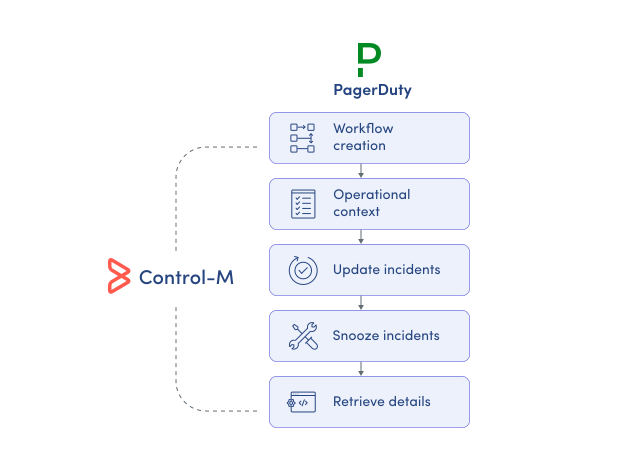
PagerDuty manages incident response, but the triggering failure may sit elsewhere in a complex enterprise workflow. Control-M connects the incident action to the jobs and dependencies that produced it, giving operations teams coordinated execution and response:
-
Create incidents from workflows
-
Pass incident-specific operational context
-
Update existing PagerDuty incidents
-
Snooze incidents when required
-
Retrieve incident details programmatically
SLA ASSURANCE
Put PagerDuty response inside the end-to-end SLA
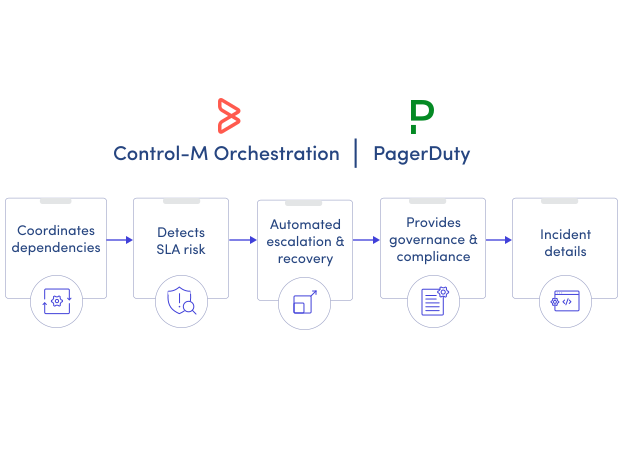
PagerDuty shows responders the incident; it does not by itself represent every workload dependency that determines business-service completion. Control-M connects PagerDuty jobs to the broader production flow and its SLA context, helping operations teams manage:
-
End-to-end workflow dependencies
-
PagerDuty job execution status
-
Job results and output
-
SLA job attachment
-
Cross-platform operational visibility
Documentation
Bring order to complex workflows
Learn how Control-M helps teams orchestrate complex processes with greater visibility, coordination, and control.
