Let us know how we can help
Sales & Pricing
Speak to a rep about your business needs

Help & Support
See our product support options
General inquiries and locations
Contact us


 Control-M + Microsoft Fabric
Your data workflow starts before a Microsoft Fabric pipeline executes — and it can fail when something upstream breaks. A source file never arrives. A dependent process finishes late. Control-M orchestrates the full chain: ingestion, transformation, Microsoft Fabric execution, validation, and downstream delivery.
common workflow issues
Does this sound like your week?
UPSTREAM DELAYS
The Fabric pipeline is scheduled. The source file never arrived.
Control-M monitors file arrivals, cloud storage events, APIs, and upstream job completion before launching Fabric workloads. Missing dependencies automatically delay execution, trigger alerts, and prevent downstream failures from spreading across the workflow.
CROSS-TOOL FLOWS
Data Factory finished. Your Fabric notebook never started.
Control-M detects successful completion states from Azure Data Factory, Databricks, Airflow, and other platforms, then immediately triggers Fabric workloads. No polling loops, disconnected schedulers, or manual intervention are required.
FAILURE RECOVERY
A warehouse refresh failed at 2:13 AM.
Control-M applies configurable retries, exception handling, and dependency-aware recovery logic. Failed Fabric activities can be restarted independently without rerunning unaffected workflow stages, reducing recovery time and operational effort.
SLA RISK
Executive dashboards are due at 7:00 AM.
Control-M continuously tracks workflow progress against business SLAs. Pre-breach alerts identify risks before deadlines are missed, allowing teams to intervene before reports, dashboards, and downstream consumers are affected.
DATA LINEAGE
The Power BI report is wrong. Nobody knows why.
Control-M provides visibility across dependencies spanning ingestion, Fabric pipelines, notebooks, Lakehouses, warehouses, and reporting layers. Teams can quickly identify failed components and resolve issues before they impact business users.
Control‑M + Microsoft Fabric
Control‑M + Microsoft Fabric
|
workload.types |
Fabric Data Factory pipeline execution · parameterized pipeline runs · cross-workspace pipeline orchestration · data movement pipelines · data transformation pipelines |
|
trigger.type |
file arrival (ADLS · Azure Blob · SFTP) · Fabric pipeline completion · notebook completion · API/webhook · time schedule · upstream job exit code |
|
cross_tool.deps |
Azure Data Factory run trigger · Apache Airflow DAG trigger · Databricks job completion · Azure Storage event · REST API call · file delivery confirmation |
|
cloud.platforms |
Microsoft Azure · Microsoft Fabric SaaS · hybrid cloud · on-premises connected environments |
|
error_handling |
configurable retry count · retry interval · downstream cascade prevention · automated job hold on upstream fail · SLA pre-breach alert · Microsoft Teams notification · ServiceNow integration |
|
throughput |
high-volume batch processing · large-scale analytics workloads · Spark execution · event-driven orchestration · enterprise data movement |
|
observability |
job-level audit log · SLA tracking with breach prediction · dependency lineage graph · centralized operations dashboard · SIEM-compatible event stream |
end-to-end orchestration
One production workflow. Every tool in the stack.
Control-M orchestrates workflows across Microsoft Fabric, Azure Data Factory, Databricks, Power BI, file transfers, and cloud services in a single job flow — with dependency tracking, SLA visibility, and automated recovery across all of them.
- Cross-tool dependency: Azure Storage → Fabric Data Factory → Fabric Notebook → Power BI Refresh
- Data-aware triggers: file arrival, API event, notebook completion, warehouse refresh completion
|
Microsoft Fabric |
Fabric Data Factory pipeline execution · parameterized pipeline runs · cross-workspace pipeline orchestration · data movement pipelines · data transformation pipelines |
|
Azure Data Factory |
dependency management · execution monitoring · event-based triggering |
|
Power BI |
dataset refresh orchestration · report readiness validation · status monitoring |
|
Databricks |
job execution · completion tracking · automated recovery |
|
Azure Storage |
file arrival detection · validation · workflow triggering |
|
SQL Server |
data load coordination · dependency tracking · exception handling |
|
REST APIs |
workflow initiation · status validation · cross-platform integration |
airflow coexistance
Control‑M doesn’t replace your Airflow DAGs. It runs the layer above them.
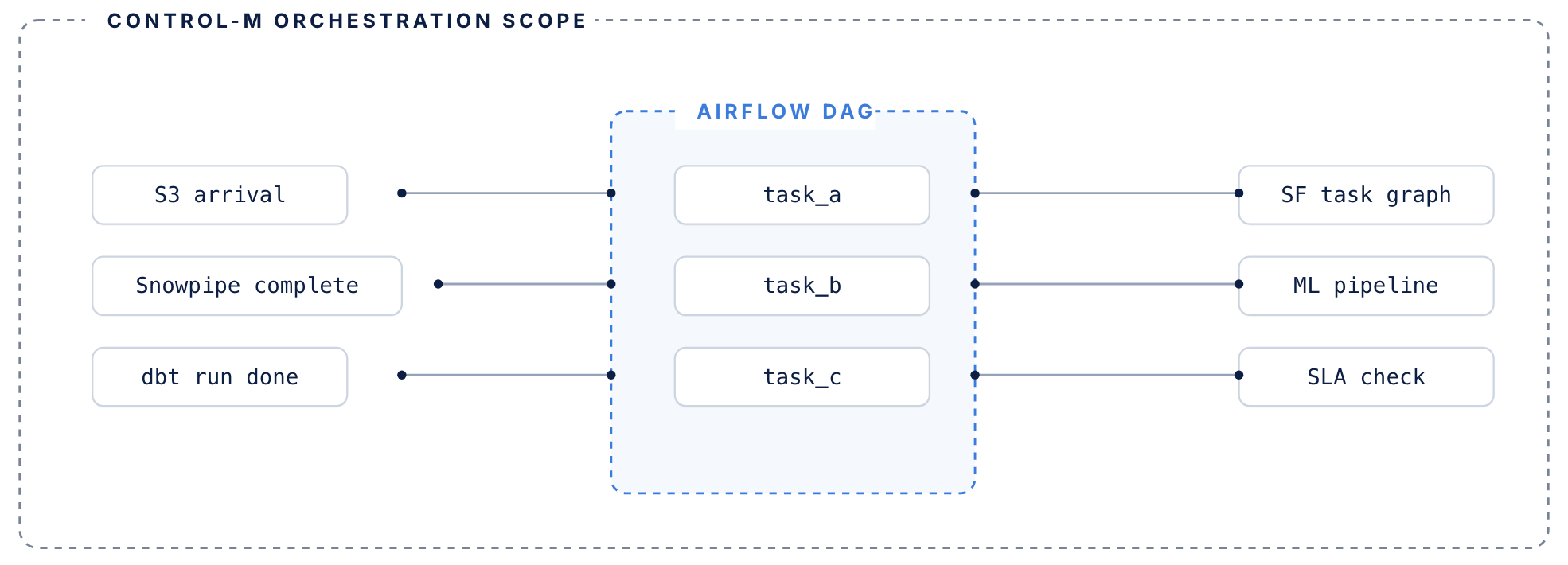
Airflow manages its DAG. Control-M manages everything surrounding it.
airflow handles
DAG-level orchestration inside the data pipeline
- DAG-level task orchestration within data pipelines
- Python operators, sensors, and task dependencies
- Execution graph for jobs that run inside your pipeline
- Manages retries within a single DAG context
control-m adds
The coordination layer around your DAGs
- Coordination layer around DAGs — triggers Airflow based on upstream conditions: file arrivals, API events, other tool completions
- Tracks each DAG’s SLA contribution across the full end-to-end workflow, not just its own routine
- Manages failure recovery when upstream dependencies fail before Airflow even starts
- Existing DAGs don’t need to be rewritten or migrated
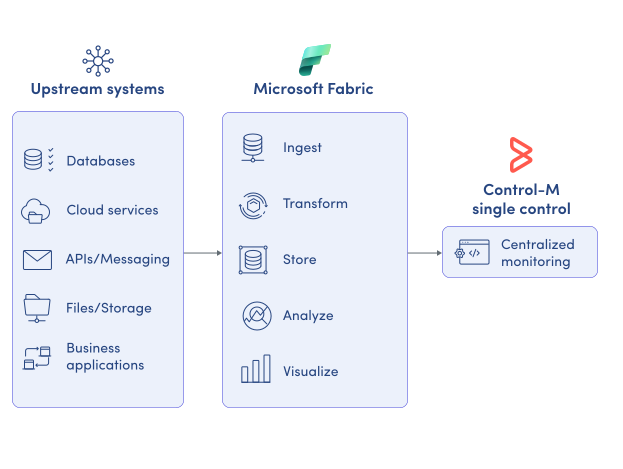
MONITOR WORKFLOWS
Monitor Microsoft Fabric execution in one place.
Microsoft Fabric provides visibility into activities running inside the platform, but production workflows often span multiple systems. Control-M delivers centralized operational visibility across the entire workflow, including:
-
End-to-end workflow status
-
Runtime and duration history
-
Dependency visualization
-
Failure root-cause tracking
-
SLA risk indicators
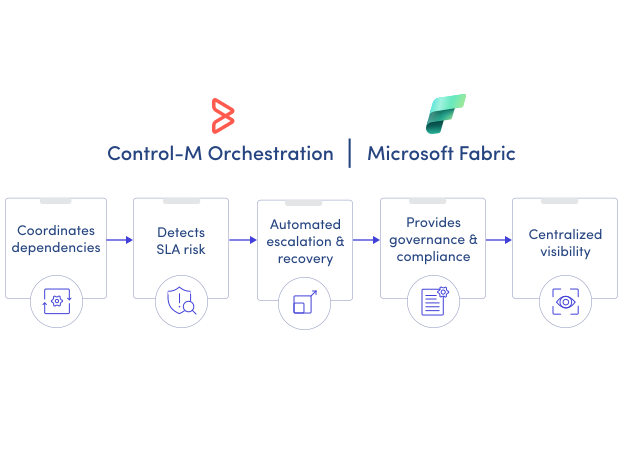
SLA ASSURANCE
Keep Fabric data products on schedule.
Data teams are measured by business outcomes and delivery deadlines—not individual task completion. Control-M continuously monitors workflow progress against SLAs and identifies risks before downstream consumers are affected:
-
SLA breach prediction
-
Automated escalation paths
-
Priority-based workload handling
-
Critical path visibility
-
Business service monitoring
